Samsung Galaxy S26 Ultra vs S25 Ultra: Is It Worth the Upgrade?
Samsung Galaxy S26 Ultra vs S25 Ultra: compare cameras, Privacy Display, performance, battery and price to decide which flagship is worth buying.


Every new Samsung Ultra flagship raises the same question: are the improvements substantial enough to justify paying for another premium smartphone? The Samsung Galaxy S26 Ultra vs S25 Ultra comparison is particularly interesting because the newer model focuses on meaningful hardware changes rather than simply increasing megapixel counts or adding another set of AI features.
Read Also: Samsung Galaxy S26 Ultra: Specs, Regional Availability, Price, and Competitor Comparison
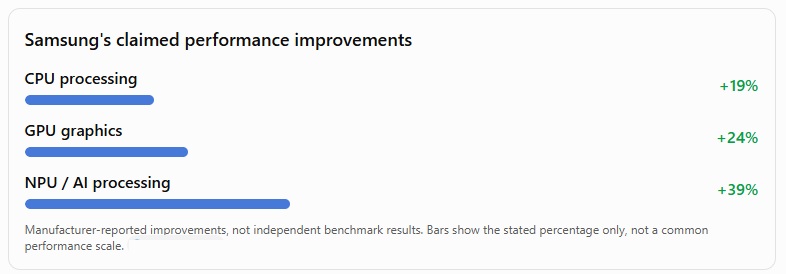
The Galaxy S25 Ultra remains a powerful phone with a 200MP main camera, a large 6.9-inch display, an S Pen and a premium titanium frame. The S26 Ultra builds on that foundation with a hardware Privacy Display, a wider main-camera aperture, a newer Snapdragon processor and faster wired charging. Samsung also claims a 19% CPU improvement, a 24% GPU improvement and a 39% improvement in NPU performance over the S25 Ultra.
Read Also: Samsung Galaxy S26 Ultra Release Date, Pre-Order Timeline, and Global Availability Guide
Key Takeaways: S26 Ultra vs S25 Ultra
- Privacy Display: The Galaxy S26 Ultra’s hardware-based viewing-angle restriction is a standout reason to consider upgrading, particularly if you regularly use your phone in public.
- Camera improvements: The S26 Ultra’s 200MP main camera with an f/1.4 aperture is designed to capture more light than the S25 Ultra’s f/1.7 camera.
- Faster charging: Both phones have 5,000mAh batteries, but the S26 Ultra supports 60W wired charging compared with the S25 Ultra’s 45W.
- Newer processor: The Snapdragon 8 Elite Gen 5 for Galaxy targets better performance and AI processing than the S25 Ultra’s Snapdragon 8 Elite for Galaxy.
- The buying decision: If you already own the S25 Ultra, the upgrade is most compelling for privacy, camera improvements and charging speed. If you own an older Ultra, the overall improvement may be easier to justify.
If you are still comparing launch timing, availability and purchase incentives, start with [Read More: Check out our complete guide on the Samsung Galaxy S26 Ultra Release Date and Pre-Order Offers (internal_link: /samsung-s26-ultra-release-date)].
Samsung Galaxy S26 Ultra vs S25 Ultra: Side-by-Side Specifications
The table below highlights the major hardware differences. Specifications are based on Samsung’s published information where available; regional configurations and pricing can differ.
| Specification | Galaxy S26 Ultra | Galaxy S25 Ultra |
|---|---|---|
| Display | 6.9-inch Dynamic AMOLED 2X, 120Hz, built-in Privacy Display | 6.9-inch Dynamic AMOLED 2X, 120Hz |
| Resolution | QHD+ | QHD+ |
| Processor | Snapdragon 8 Elite Gen 5 for Galaxy | Snapdragon 8 Elite for Galaxy |
| Main camera | 200MP, f/1.4 | 200MP, f/1.7 |
| Ultra-wide camera | 50MP, f/1.9 | 50MP, f/1.9 |
| 5x telephoto camera | 50MP, f/2.9 | 50MP, f/3.4 |
| 3x telephoto camera | 10MP, f/2.4 | 10MP, f/2.4 |
| Front camera | 12MP | 12MP |
| Battery | 5,000mAh | 5,000mAh |
| Wired charging | Up to 60W | Up to 45W |
| Wireless charging | Up to 25W, Qi2-compatible charging setup | Up to 15W, Qi2-ready with compatible accessories |
| Frame | Armor Aluminum | Titanium |
| Thickness | 7.9mm | 8.2mm |
| Weight | 214g | 218g |
| Launch US MSRP | $1,299+* | $1,299+* |
*The starting MSRP figures are reference points for the US market, not guaranteed current retail prices. Verify storage-specific pricing, regional availability and promotions before publishing or purchasing. Samsung’s published specifications confirm the S26 Ultra’s camera apertures, dimensions and charging improvements.
The biggest differences: the Privacy Display, camera aperture improvements, newer processor and 60W charging. Battery capacity and the core large-screen experience remain broadly similar.
Read Also: Best Samsung Galaxy S26 Ultra Deals and Where to Buy
Design & Display: Hardware Privacy Display vs. Standard Screen


The display is one of the most significant differences in the Samsung Galaxy S26 Ultra vs S25 Ultra comparison. Both phones offer a spacious 6.9-inch AMOLED experience, but the S26 Ultra introduces a feature that addresses a practical problem for people who use their phones in crowded environments: unwanted screen viewing.
Galaxy S26 Ultra Privacy Display: How Does It Work?
The S26 Ultra includes a built-in hardware Privacy Display that restricts visibility from off-center viewing angles. When activated, the display remains visible to the person looking directly at it while appearing dimmer from the side. You can enable it for the entire screen or configure it for selected apps and sensitive notifications.
Consider these everyday situations:
- Commuting: Make it harder for nearby passengers to read your messages or view your banking app.
- Working in public: Reduce casual shoulder-surfing when reviewing emails, documents or confidential information.
- Using authentication screens: Apply privacy settings to sensitive apps or credential entry.
There is an important limitation: Privacy Display is not a substitute for strong authentication or careful handling of confidential information. Some content may remain visible depending on brightness, viewing conditions and angles. Samsung also notes that image quality can change outside the intended viewing angle.
Display Quality: Is the S26 Ultra Better for Watching Content?
For video streaming, reading, gaming and general browsing, the two phones are closer than their headline differences might suggest. Both have large, high-resolution displays with adaptive refresh rates, so upgrading solely for screen size or smooth scrolling is difficult to justify.
The Privacy Display is the differentiator, not a fundamentally larger panel. If you spend hours watching films or editing photographs, compare real-world brightness, color reproduction and reflections before assuming the newer model will deliver a dramatic improvement in every situation.
Build Quality: Titanium vs. Armor Aluminum 2
The S25 Ultra uses a titanium frame, while the S26 Ultra moves to Armor Aluminum. The S26 Ultra measures approximately 7.9mm thick and weighs 214g, compared with the S25 Ultra’s 8.2mm and 218g. That makes the newer phone thinner and lighter, although the difference is modest in daily use. Some buyers may prefer the feel and perceived premium character of titanium, while others will appreciate the S26 Ultra’s lower weight.
Design verdict: The S26 Ultra wins on integrated privacy and portability. The S25 Ultra remains an excellent choice if you prefer titanium and do not need viewing-angle protection.
Camera Systems: Wider Lens Apertures Over Megapixel Chases


The camera comparison is about light capture and processing, not just megapixels. Both phones use a 200MP primary camera, but the S26 Ultra has wider apertures on its main and 5x telephoto cameras. That change can make a practical difference in challenging lighting, especially when shooting handheld at night.
200MP Main Camera: f/1.4 vs. f/1.7
A lens aperture describes how much light can enter the camera. A lower f-number generally means a wider aperture, allowing more light to reach the sensor under comparable conditions.
The S26 Ultra’s f/1.4 main camera aperture is wider than the S25 Ultra’s f/1.7 aperture. Samsung says the new main camera offers 47% improved brightness in its Nightography comparisons. That is a manufacturer-stated improvement under its comparison conditions, not a guarantee that every photograph will be 47% brighter or better.
- Indoor events and restaurants with subdued lighting.
- Nighttime street scenes and city skylines.
- Moving subjects where a faster shutter speed can help reduce motion blur.
- Video scenes where available light is limited.
Actual results also depend on sensor characteristics, shutter speed, stabilization, image processing and the subject’s movement. A wider aperture is an advantage, but it does not automatically make every photo superior.
50MP Telephoto: Better Low-Light Zoom?
The S26 Ultra’s 50MP 5x telephoto camera uses an f/2.9 aperture, compared with f/3.4 on the S25 Ultra. Samsung reports a 37% brightness improvement for its 5x telephoto camera under its comparison conditions. This matters because telephoto cameras often struggle more than main cameras in low light. The wider aperture should help the newer phone capture brighter zoomed-in scenes without relying as heavily on longer exposures or aggressive processing.
Both devices also offer a 10MP 3x telephoto camera. If you frequently photograph distant subjects, concerts, travel landmarks or portraits at different focal lengths, the S26 Ultra’s improved 5x camera is a more relevant upgrade than its shared 200MP headline resolution.
Ultra-Wide, Selfies and Video
The S26 Ultra has a 50MP f/1.9 ultra-wide camera, a 10MP f/2.4 3x telephoto camera and a 12MP front camera. These specifications indicate that the main hardware changes are concentrated in the primary and 5x telephoto cameras rather than every camera receiving a new sensor.
For video creators, the newer processor and improved low-light camera hardware are promising, especially for nighttime footage. However, do not assume that every resolution and frame-rate combination is supported across every camera. Verify the specific recording modes, including any 4K high-frame-rate options, against Samsung’s official regional specifications before making that a purchase criterion.
Camera verdict: The S26 Ultra is the stronger choice for low-light photography and zoomed-in nighttime scenes. If most of your pictures are taken in daylight, the S25 Ultra’s camera system remains highly capable, and the real-world difference may be less dramatic.
Performance & AI Capabilities: Silicon Benchmarks
The S26 Ultra uses the Snapdragon 8 Elite Gen 5 for Galaxy, while the S25 Ultra uses the Snapdragon 8 Elite for Galaxy. One important correction for buyers comparing chip names: the S25 Ultra does not use the Snapdragon 8 Gen 3. That older chipset belongs to the Galaxy S24 Ultra generation.
Samsung reports the following gains for the S26 Ultra over the S25 Ultra:
Gaming and Thermal Management
A newer processor can improve frame rates, graphics capability and power efficiency, but sustained performance depends on cooling, ambient temperature, game optimization and graphics settings. Short benchmark results alone cannot tell you whether the S26 Ultra will maintain higher frame rates during a long gaming session.
For most everyday tasks—messaging, web browsing, office apps, navigation and video streaming—the S25 Ultra already has more than enough performance. The S26 Ultra is easier to recommend to heavy gamers, mobile creators and users who regularly run demanding AI features, but an ordinary user may not notice the full headline gain.
For a broader look at Samsung’s software ecosystem, see [Related: Explore all the new Galaxy AI tools in our One UI 8.5/9 Features Walkthrough (internal_link: /galaxy-ai-one-ui-features)].
Performance verdict: The S26 Ultra has the stronger processor and greater performance headroom. However, a faster chip alone is not a compelling reason for most S25 Ultra owners to upgrade.
Battery Endurance & Charging Speeds
Both phones feature a 5,000mAh battery, so the S26 Ultra does not offer a larger battery on paper. Its advantages come from charging speed, processor efficiency and Samsung’s overall power management.
60W vs. 45W Wired Charging
The S26 Ultra supports up to 60W wired charging, compared with 45W on the S25 Ultra. Samsung states that the S26 Ultra can reach approximately 75% charge in around 30 minutes under its specified conditions. Actual results depend on the charger, cable, temperature, battery level and usage during charging.
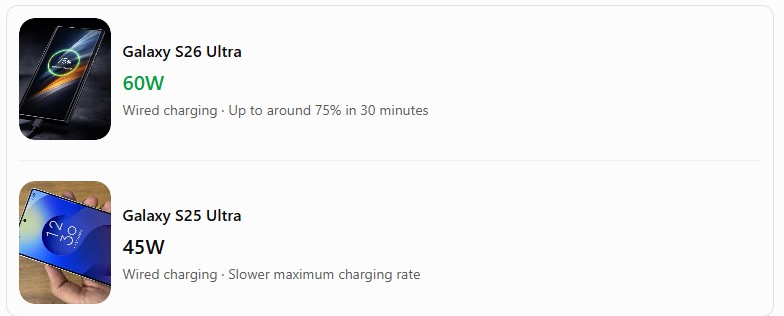
Galaxy S25 Ultra 45W
Wired charging · Slower maximum charging rate
The S26 Ultra is more convenient if you frequently top up your phone before leaving home or during a short break. However, 60W is a maximum supported rate, not a constant charging speed throughout the entire charging cycle.
Remember that you may need a compatible power adapter to achieve the advertised rate. Samsung does not include a travel adapter in the S26 Ultra’s retail box in the cited regional listing.
The S26 Ultra supports up to 25W wireless charging, while the S25 Ultra supports up to 15W. For the newer phone, check the charger and accessory requirements for the advertised Qi2-compatible charging experience before buying additional hardware.
Battery endurance is harder to compare from capacity alone. Samsung advertises up to 31 hours of video playback for the S26 Ultra, but that figure comes from controlled testing and should not be interpreted as a guaranteed screen-on time for every user.
For a meaningful battery comparison, consider your own routine:
- Heavy use: Gaming, navigation, mobile data and extended camera use can drain either device quickly.
- Office use: Email, calls, messaging and browsing are less demanding than sustained gaming.
- Travel: Faster wired charging can be more useful than a small difference in estimated battery endurance.
Battery verdict: The S26 Ultra wins on charging convenience. If your S25 Ultra comfortably lasts all day, the charging upgrade alone may not justify replacing it.
Upgrade Decision Framework: Which Phone Should You Buy?
The best choice depends on the phone you currently own, your budget and which improvements matter to you. Use this matrix to make the decision more practical.
Read Also: Samsung Galaxy S26 Ultra Mobile Cover Guide: How to Pick the Right Mobile Cover
| Your situation | Recommended choice | Why |
|---|---|---|
| You own a Galaxy S25 Ultra | Usually keep the S25 Ultra | The existing phone remains powerful; upgrade for specific new features. |
| You own a Galaxy S24 Ultra | Compare trade-in offers | The S26 Ultra adds privacy, a newer processor and camera improvements. |
| You own a Galaxy S23 Ultra or S22 Ultra | Consider the S26 Ultra | The combined changes in performance, cameras, display technology and charging are more substantial. |
| You regularly use your phone on public transport | S26 Ultra | The hardware Privacy Display is a practical benefit. |
| You shoot nighttime photos or zoomed video | S26 Ultra | Wider apertures on the main and 5x telephoto cameras are useful. |
| You prefer a titanium frame | S25 Ultra | The S26 Ultra uses Armor Aluminum. |
| You are satisfied with 45W charging | S25 Ultra | Faster charging may not add much value to your routine. |
| You find the S25 Ultra heavily discounted | Compare total ownership cost | A substantial price gap may outweigh the newer hardware. |
Upgrade to the Galaxy S26 Ultra If…
- You want the built-in Privacy Display for work, commuting or handling sensitive information in public.
- You regularly photograph dimly lit scenes and want the benefit of wider camera apertures.
- You value faster 60W wired and 25W wireless charging.
- You play demanding games or use processor-intensive AI tools and want additional performance headroom.
- You are upgrading from an S23 Ultra, S22 Ultra or an even older device and want a broader improvement across several areas.
Stick with the Galaxy S25 Ultra If…
- Your phone is already fast enough for your apps, games and daily workload.
- You are happy with its camera quality, including nighttime photography.
- You prefer its titanium frame or have already invested in accessories for it.
- You rarely need to recharge quickly and are satisfied with 45W wired charging.
- The price difference between the two models is significant.
If you already own last year’s flagship, before making a purchase. A long-term assessment can help determine whether the older model’s battery life, display and camera system still meet your needs.
S26 Ultra Price and Specs Comparison: Is the Extra Cost Justified?
The financial side of this decision is just as important as the specifications. A newer flagship may be technically better, but that does not automatically make it the better purchase.
Samsung’s US launch pricing should be treated separately from current retail pricing, carrier deals and trade-in promotions. The S26 Ultra’s actual cost will depend on storage capacity, country, retailer and any applicable discounts. In Pakistan, for example, Samsung’s official product listing shows different prices for the 256GB, 512GB and 1TB configurations.
- The current cash price of the S26 Ultra.
- The current cash price of the S25 Ultra with the same storage capacity.
- The trade-in value or resale price of your existing phone.
- The cost of any new charger or accessories you need.
A useful calculation is:
Net upgrade cost = S26 Ultra purchase price − value recovered from your existing phone.
For example, if you can sell your S25 Ultra for a reasonable amount, the net cost of upgrading may be substantially lower than the new phone’s full retail price. Conversely, if the S25 Ultra is available at a steep discount, buying the older model may provide better value.
Do not assume that a trade-in bonus or advertised discount is automatically the best deal. Compare the final payable amount, warranty coverage, storage capacity and seller reliability.
Final Verdict: Is the Galaxy S26 Ultra Worth Upgrading To?
The Samsung Galaxy S26 Ultra is a meaningful refinement of the S25 Ultra, but it is not an essential upgrade for every existing owner.
Its strongest improvements are the hardware Privacy Display, wider camera apertures, newer Snapdragon processor and faster charging. These are practical changes rather than purely cosmetic differences, particularly for people who use their phones professionally, take photographs in difficult lighting or need better privacy in public.
However, the S25 Ultra still offers a large high-resolution display, a capable 200MP camera system, strong flagship performance, an S Pen and a titanium frame. If your current phone already handles everything you need, the S26 Ultra may not deliver enough day-to-day improvement to justify its full purchase price.
Our recommendation: Buy the Galaxy S26 Ultra if you are upgrading from an S22 Ultra or S23 Ultra, or if Privacy Display and improved low-light photography solve specific problems for you. If you already own an S25 Ultra, keep it unless the new features matter enough to justify the net upgrade cost.
For buyers choosing between the two phones for the first time, the S26 Ultra is the more capable flagship, but the S25 Ultra can be the smarter value purchase at the right discount.
Frequently Asked Questions
Is the Galaxy S26 Ultra noticeably faster than the S25 Ultra?
Samsung reports a 19% CPU improvement, 24% greater GPU performance and 39% higher NPU performance for the S26 Ultra compared with the S25 Ultra.
How does the Galaxy S26 Ultra Privacy Display work?
The S26 Ultra uses built-in display technology to limit visibility from side angles. You can activate it for the whole screen or configure privacy for selected apps and sensitive notifications. It is designed to reduce casual viewing by others, but it does not guarantee that nobody can see your screen.
Do Galaxy S25 Ultra cases fit the Galaxy S26 Ultra?
Do not assume they will fit correctly. The S26 Ultra has different dimensions and a revised camera design. Even though the phones have similar screen sizes, differences in thickness, camera placement, button alignment and cutouts can make an older case incompatible. Choose a case specifically designed for the Galaxy S26 Ultra.
Is the S26 Ultra camera better than the S25 Ultra camera?
The S26 Ultra has a wider f/1.4 main-camera aperture and an f/2.9 5x telephoto camera. Samsung reports improved brightness in its Nightography comparisons.
These improvements are most relevant in low light; daylight results will also depend on processing, scene conditions and photography technique.
Does the Galaxy S26 Ultra have a bigger battery than the S25 Ultra?
No. Both phones have a 5,000mAh battery. The S26 Ultra’s key advantages are faster wired charging, faster wireless charging and potential efficiency improvements rather than a larger battery capacity.
Is the Galaxy S25 Ultra still worth buying in 2026?
Yes, if you find it at a good price from a reputable seller and its hardware meets your needs. It remains a capable flagship with a premium display, versatile cameras, strong performance and an S Pen. Check software-support status, warranty coverage, battery condition if buying used, and the price difference before deciding.
Which phone offers better value for money?
The answer depends on current local pricing. The S26 Ultra is the stronger choice for new hardware and privacy features, while the S25 Ultra may deliver better value if it is substantially cheaper. Compare equivalent storage configurations and calculate the net upgrade cost rather than relying on launch prices alone.