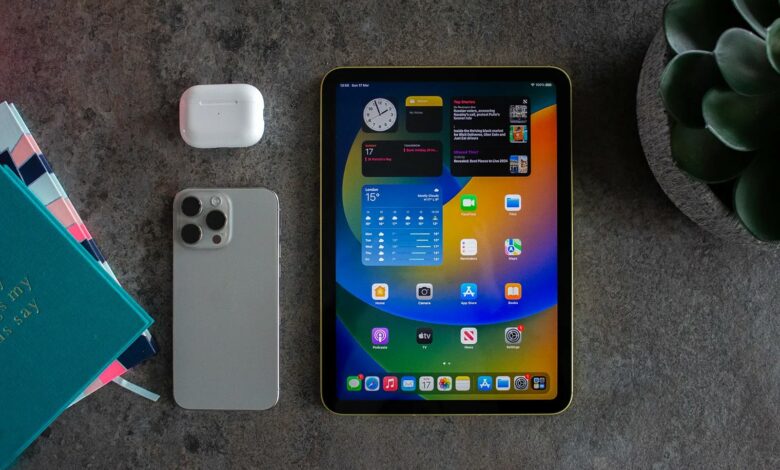
The latest apple’s iPad 10th-generation introduced in a modern design, upgraded accessories, and new features that make it a perfect choice for die heart fans whether they are students, or professionals alike. The 10.9 inches LED with high performance resolution, quad core GPU makes it positioned as a one step ahead in iPads. I feel and i know you would also feel after use, this model brings significant improvements within your budget. Let’s have a look the key specifications and features.
Read Also: Review On iPad 8th Generation
Article Outline
- 1 iPad 10th Generation Key Specs
- 2 Performance and Chipset
- 3 FAQs
- 3.0.0.1 Why iPad 10the Generation like so much?
- 3.0.0.2 Are iPad 10the Generation waterproof?
- 3.0.0.3 Are iPad 10the Generation use apple pencil? answer in short paragraph?
- 3.0.0.4 When iPad 10the Generation release?
- 3.0.0.5 Where to buy iPad 10the Generation?
- 3.0.0.6 Can iPad 10the Generation with cellular?
- 3.0.0.7 Which one is best iPad 10the Generation vs ipad air?
- 3.1 Editorial Note
iPad 10th Generation Key Specs
The iPad 10th Generation is a game-changer Apple’s product released in October 2022. A refreshed design, USB-C, and better performance compared to its predecessor. This model strikes a balance between budget with modern features that makes it an excellent choice for students, gamers and no doubt for the professionals also.
Design and Display
The iPad 10th Gen embraces Apple’s more modern design language, This edge-to-edge display provides vibrant colors, sharp details, and True Tone technology for a comfortable viewing experience in various lighting conditions. Unlike predecessor models, Apple redesigned the 10th-gen iPad to match the aesthetics of the iPad Air, with thinner bezels with no Home button and replaced it with a power button with integrated Touch ID. The key display details are:
- Screen Size: 10.9-inch Liquid Retina Display
- Resolution: 2360 x 1640 pixels
- Brightness: 500 nits
- True Tone: Yes
- Design: All-screen design with flat edges (similar to iPad Air)
- Colors: Blue, Pink, Silver, and Yellow
- Touch: ID Sensor with top power button
Performance and Chipset
Under the hood, the iPad 10th Gen is powered by the A14 Bionic chip, the same processor found in the iPhone 12. This 6-core CPU and quad-core GPU combination delivers a perfect performance boost over the predecessor generation, making multitasking, gaming, and creative tasks smoother and more efficient. Whether you’re editing photos, playing games, or running multiple apps, the A14 Bionic ensures a responsive experience.
- CPU Chip: A14 Bionic 6-core
- GPU Chip: A14 Bionic Quad-core
- Neural Engine: 16-core for AI and machine learning tasks
- Performance Boost: 20% faster CPU and 10% better graphics compared to the 9th-gen iPad
Camera
Apple has repositioned the front-facing to the landscape edge, making video calls more natural, especially when using the iPad in a horizontal orientation. This is a much needed change for remote officers and obviously for the students. The rear camera is also a 12MP sensor support for capturing high-quality photos and 4K videos.
- Rear Camera: 12MP (f/1.8), 4K video recording at 24, 25, 30, and 60 fps
- Front Camera: 12MP Ultra-Wide (f/2.4) with 122° field of view
- Center Stage: Yes, for better video calls
Audio
The device features a stereo speaker setup, enhancing audio quality for media consumption, video calls, and gaming. While not as advanced as the iPad Pro’s quad-speaker system, the iPad 10th Gen still provides a rich audio experience.
Accessories Support
Apple Pencil
One of the prominent modification with this model is its compatibility with the 1st-gen Apple Pencil. However, it does not support the Apple Pencil 2nd Gen, which is a drawback for digital artists and also the transition to USB-C, an additional adapter is required to charge and pair the Apple Pencil, which may be inconvenient for some users but no doubt, switching to USB-C type makes charging and accessory connections more convenient, aligning with modern Apple devices. The iPad 10th Gen also supports the new Magic Keyboard Folio, providing a full-size keyboard and trackpad for a laptop-like experience.
- Apple Pencil: Supports 1st Gen Apple Pencil (requires USB-C to Lightning adapter)
- Keyboard: Works with Magic Keyboard Folio (detachable keyboard and trackpad)
Battery Support
Apple promises up to 10 hours of battery life for web browsing or video playback, making it a reliable companion for all-day use even in your travelling.
- Battery Life: Up to 10 hours (Wi-Fi browsing or video playback)
- Charging: USB-C fast charging
Other Connectivity
The switch from Lightning to USB-C makes connectivity more universal, allowing for faster data transfer and a broader range of accessory support. Wi-Fi 6 ensures faster wireless performance, and cellular models support 5G connectivity for on-the-go productivity.
- Charging Port Type: USB-C (no more Lightning port)
- Wi-Fi Support: Wi-Fi 6 for faster connectivity
- Cellular Data Support: 5G support (in cellular models)
- Bluetooth: 5.2
iPad 10th Generation Software Features
The iPad 10th Generation brings a refreshed design and improved performance, but its software features are what truly make it shine. Running iPadOS 16 (upgradable to iPadOS 17), this device is packed with powerful tools for productivity, creativity, and entertainment. Whether you’re a student, a professional, or a gaming user, the iPad 10th Gen will give a a game changing experience. Let’s dive into its top software features.
Key Features of iPadOS 17
- Customizable Lock Screen – Personalize your lock screen with widgets, fonts, and wallpapers.
- Interactive Widgets – Access live updates from apps without opening them.
- Improved Stage Manager – Enhanced multitasking experience, making it easier to manage multiple apps.
- Health App for iPad – Track health data directly on your iPad.
- Better PDF and Notes Integration – Enhanced Apple Pencil features for note-taking and PDF markup.
Multitasking with Stage Manager
The Stage Manager feature in iPadOS allows users to run multiple apps simultaneously with resizable, overlapping windows—bringing a desktop-like experience to the iPad. While previously limited to M1/M2 iPads, iPadOS 17 improves app management for A14 Bionic chip-powered devices like the iPad 10th Gen.
Why It’s Useful
- Resize windows for flexible multitasking.
- Switch between tasks faster.
- Use an external display for a dual-screen experience.
Freeform App – A Collaborative Whiteboard
Introduced in iPadOS 17, Freeform is a digital whiteboard where users can sketch, add notes, and collaborate in real-time. It’s perfect for brainstorming sessions, project planning, and creative work.
- Supports Apple Pencil for drawing.
- Drag and drop images, files, and links.
- Real-time collaboration with iCloud sync.
Enhanced Apple Pencil & Scribble Features
The iPad 10th Gen supports the 1st Gen Apple Pencil, but it also gets software improvements for better usability:
- Scribble – Handwrite in any text field, and iPad will convert it into typed text.
- Handwriting Recognition – The Notes app can recognize and search handwritten text.
- Quick Notes – Swipe up with Apple Pencil to open a quick note instantly.
FaceTime & Continuity Features
With iPadOS 17, FaceTime gets a new video effects suite and Reactions (thumbs-up, fireworks, and more). The Continuity Camera allows you to use your iPad as a webcam for Mac, enhancing video calls.
- FaceTime Reactions – Express emotions with effects.
- Handoff for FaceTime – Start a call on iPhone and transfer it to iPad.
- Live Captions – Real-time subtitles during calls for better accessibility.
Safari Enhancements & Passkeys
Safari gets Shared Tab Groups for collaborative browsing and Passkeys, a more secure way to sign in without passwords.
- Passkeys – Say goodbye to passwords, use Face ID or Touch ID for logins.
- Shared Tab Groups – Share multiple browser tabs with friends.
- Improved Web Apps – Add websites as apps to your Home Screen.
Desktop-Class Apps & File Management
iPadOS 17 continues to bring Mac-like features to the iPad, improving app functionality:
- Better mailing and File Management – Open ZIP files, sort folders, and customize file views and also improve Schedule emails, edit sent messages, and use SharePlay in iMessage.
- Pro-Level Apps – Final Cut Pro and Logic Pro are now available for iPads with powerful editing tools.
Pricing and Conclusion
The iPad 10th Gen starts at $449, placing it between the entry-level 9th Gen iPad and the more powerful iPad Air. While it lacks some premium features like a laminated display or second-gen Apple Pencil support, it offers a well-balanced experience for users who want a capable, modern iPad without breaking the bank.
Whether you’re a student, common user, or professional looking for an affordable tablet, the iPad 10th Gen is a compelling choice with a blend of design, performance, and versatility.
As of February 14, 2025, here are the top 10 online deals for the iPad 10th Generation:
| Sr No | Retailer | Model | Storage | Connectivity | Price | Promotion/Notes |
|---|---|---|---|---|---|---|
| 1 | Amazon | iPad 10th Gen | 64GB | Wi-Fi | $279 | Discounted from $349 |
| 2 | Best Buy | iPad 10th Gen | 64GB | Wi-Fi | $279 | Discounted from $349 |
| 3 | Best Buy | iPad 10th Gen | 256GB | Wi-Fi | $429 | Discounted from $499 |
| 4 | Best Buy | iPad 10th Gen | 64GB | Wi-Fi + Cellular | $429 | Discounted from $499 |
| 5 | Best Buy | iPad 10th Gen | 256GB | Wi-Fi + Cellular | $579 | Discounted from $649 |
| 6 | Amazon UK | iPad 10th Gen | 64GB | Wi-Fi | £314.97 | Available in Silver |
| 7 | John Lewis | iPad 10th Gen | 64GB | Wi-Fi | £314.97 | Available in Silver |
| 8 | Very | iPad 10th Gen | 64GB | Wi-Fi | £314.97 | Available in Silver |
| 9 | eBay | iPad 10th Gen | 64GB | Wi-Fi | £309.00 | New condition |
| 10 | iStore | iPad 10th Gen | 64GB | Wi-Fi | £329.00 | Financing options available |
Please note that prices and availability are subject to change. It’s advisable to verify current details directly with the retailers before making a purchase. and currency exchange rate will be applicable as per local government rule.