Guide to Make an Amazon Credit Card Payment
Guide to make an Amazon credit card payment online or via the app, access your Amazon credit card login, and manage Synchrony and Chase accounts stress-free.

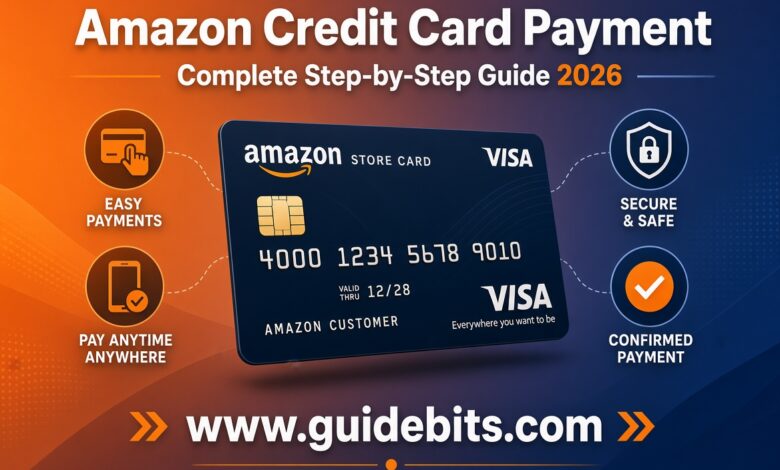
Trying to pay your Amazon credit card bill can feel surprisingly confusing. You log into Amazon, expect a big “Pay Bill Now” button, and suddenly find yourself bouncing between payment menus or directed to an entirely different bank website. The confusion comes down when multiple Amazon credit cards payment managed by two entirely separate banks. Whether you hold the Chase Prime Visa or the Synchrony Amazon Store Card, this guide written down every payment method available. You will learn how to make an amazon credit card payment through direct link, mobile app or through phone, clear your balance quickly, set up AutoPay, and avoid hidden financing traps that catch cardholders off guard.
Read Also: Best 11.11 Deals on Amazon Credit Card
Article Outline
- 1 Section 1: Identifying Your Card & Issuer (Crucial First Step)
- 2 Section 2: Step-by-Step Guide to Amazon Credit Card Payment
- 3 Section 3: How to Complete Your Amazon Credit Card Login Seamlessly
- 4 Section 4: Alternative Payment Methods (Phone, Mail, and Processing Times)
- 5 Section 5: Common Mistakes to Avoid When Paying Your Bill
- 6 Summary Checklist
Quick Answer Summary: How to Pay Your Amazon Credit Card
Prime Visa or Amazon Visa (Chase): Log in at Chase.com or the Chase Mobile App $\rightarrow$ Select your card $\rightarrow$ Click Pay Card. (Cutoff: 8:00 PM ET on the due date).
Amazon Store Card or Secured Card (Synchrony): Log in at synchrony.com/amazon or go to Amazon.com $\rightarrow$ Your Account $\rightarrow$ Your Payments $\rightarrow$ Manage Store Card. You can also use Pay as Guest on Synchrony’s portal. (Cutoff: 11:59 PM ET on the due date).
Pay by Phone: Call Chase at 1-800-436-7958 or Synchrony at 1-866-634-8379.
Section 1: Identifying Your Card & Issuer (Crucial First Step)
Before you submit a payment, check your wallet to see which amazon credit card you carry. Your card type determines which online portal, mobile app, and phone line you must use.
| Card Name | Card Type | Issuing Bank | Account & Payment Portal |
| Prime Visa | Unsecured Visa Credit Card | Chase Bank | Chase.com or Chase Mobile App |
| Amazon Visa | Unsecured Visa Credit Card | Chase Bank | Chase.com or Chase Mobile App |
| Amazon Store Card | Retail Credit Card | Synchrony Bank | synchrony.com/amazon or Amazon Payments Dashboard |
| Amazon Secured Card | Secured Credit Card | Synchrony Bank | synchrony.com/amazon |
- Chase-issued cards (Prime Visa and Amazon Visa) can be used anywhere Visa is accepted. Managing these cards relies heavily on Chase’s ecosystem.
- Synchrony-issued cards (Store Card and Secured Card) generally work only on Amazon.com and affiliated platforms. You can manage them directly through Synchrony or via Amazon’s payment settings.
Section 2: Step-by-Step Guide to Amazon Credit Card Payment
Depending on your card issuer and personal preference, choose one of these four straightforward ways to make an amazon credit card payment.
Method 1: Paying Online via Amazon.com (Direct Link)
If you have your Synchrony Store Card linked to your Amazon account, or if you have integrated your Chase Prime Visa inside Amazon’s digital wallet, you can start the process on Amazon’s site:
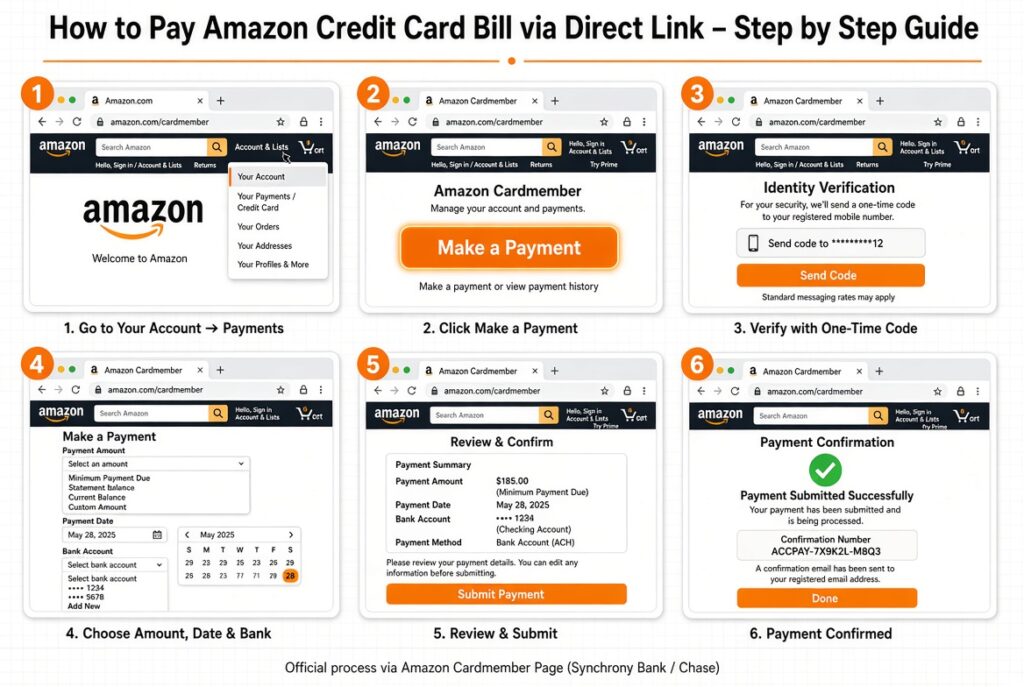
- Log into your Amazon.com account.
- Hover over Account & Lists in the top navigation bar and select Your Account.
- Click on Your Payments (or Payment options).
- Select your amazon credit card from the listed payment methods.
- Click Manage Card or Pay Bill.
- For Store Cards, Amazon redirects you to an integrated Synchrony payment frame where you select your payment amount, enter your checking account routing/account details, and confirm submission.
Method 2: Paying via Issuing Bank Portals (Chase vs. Synchrony)
Going straight to the bank portal is often the fastest and most reliable approach.

-
For Prime Visa & Amazon Visa (Chase Bank):
- Head directly to Chase.com or open the Chase Mobile app.
- Complete your amazon credit card login using your Chase credentials.
- Select your Amazon Visa card from your account dashboard.
- Click Pay Card, choose your payment amount (Minimum, Statement Balance, or Custom), pick a payment date, and submit.
-
For Amazon Store Card & Secured Card (Synchrony Bank):
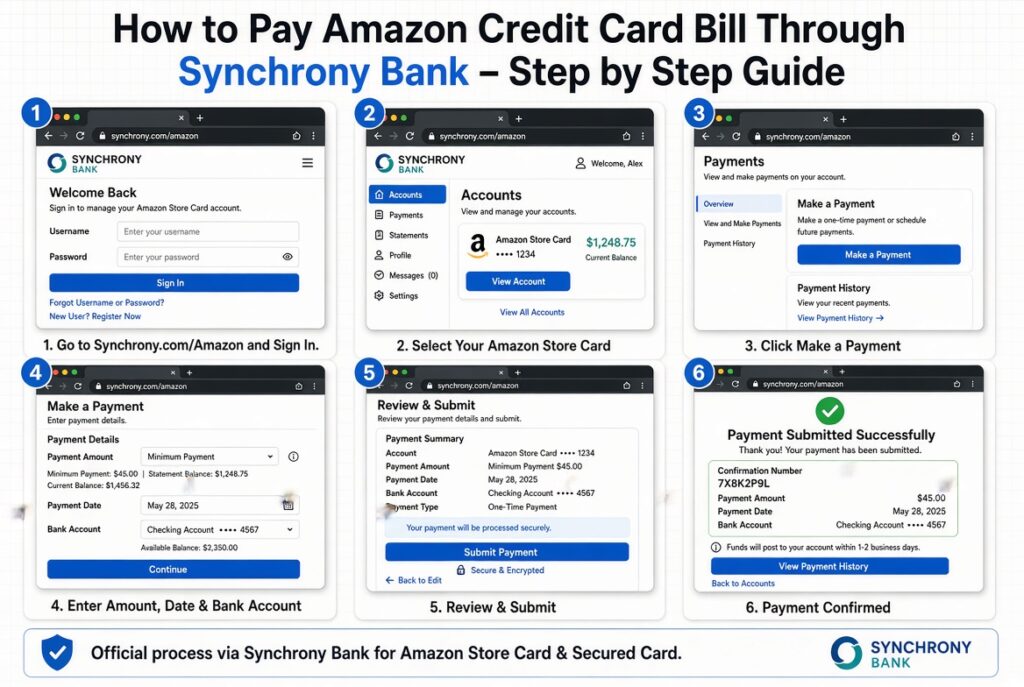
- Go directly to synchrony.com/amazon.
- Sign in with your registered Synchrony credit account credentials.
- Navigate to Make a Payment.
- Enter your bank details, pick your payment date, and hit confirm.
Method 3: Pay as Guest (Synchrony Users)
If you hold an Amazon Store Card and need to make a fast payment without logging into your full account:
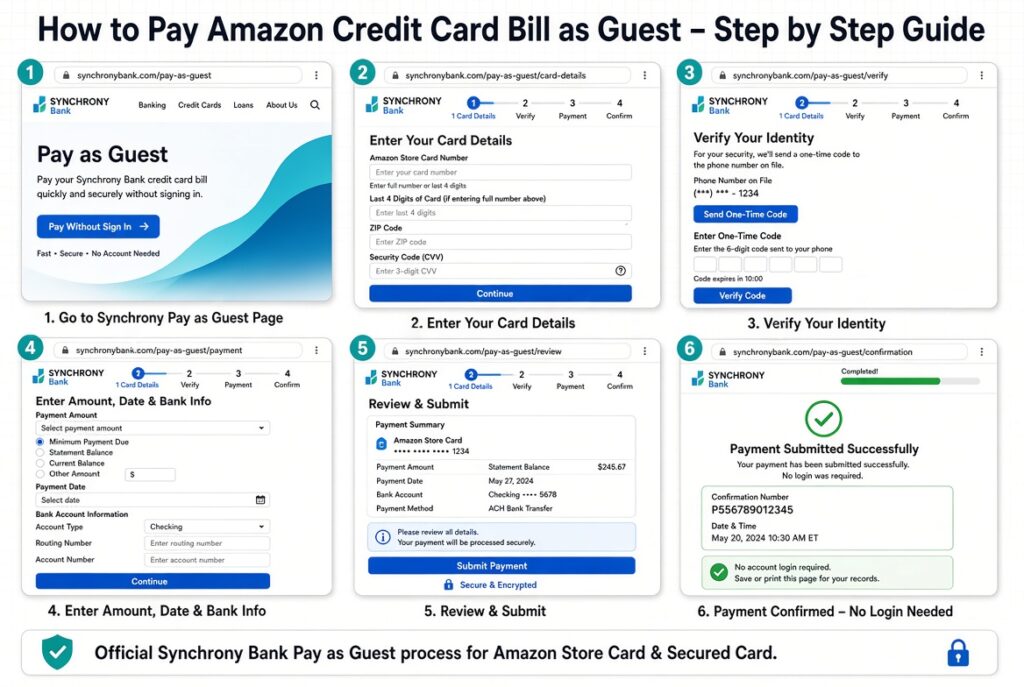
- Visit synchrony.com/amazon.
- Click the Pay as Guest button at the top of the screen.
- Enter your card account number, the last four digits of your Social Security Number, and your ZIP code.
- Follow the prompts to submit an immediate, same-day electronic payment using your bank account details.
Method 4: Automatic Payments & Mobile Apps
Setting up AutoPay removes the monthly stress of manual billing.
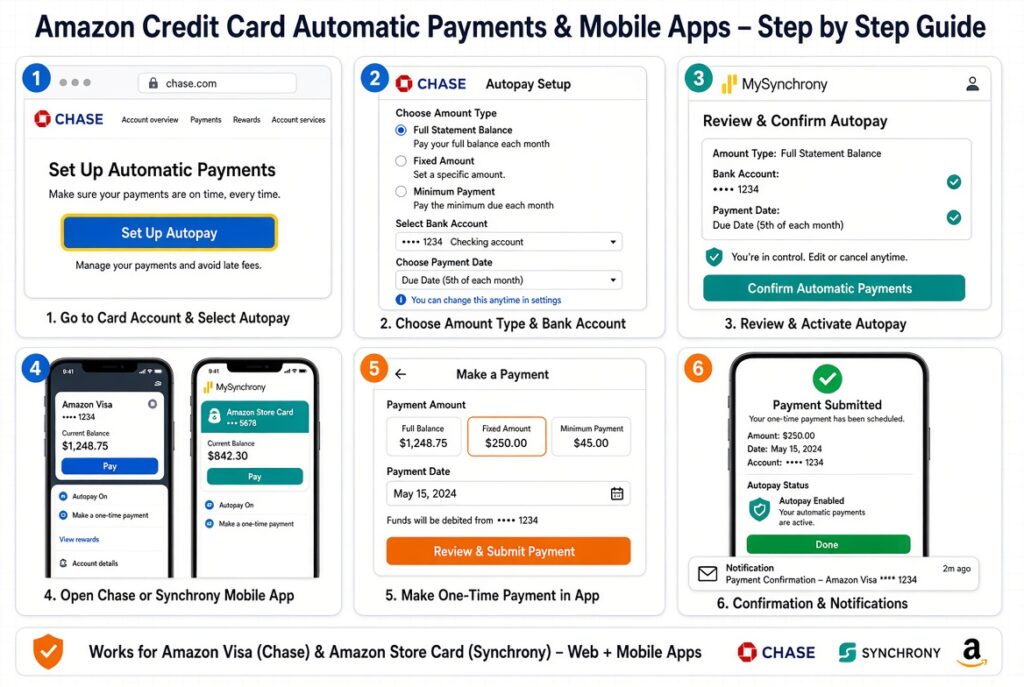
- On the Chase Mobile App: Tap your card tile, select Pay Card, choose Set up AutoPay, and pick whether to pay the minimum balance or full statement balance each cycle.
- On the Amazon / Synchrony Portal: Log into
[synchrony.com/amazon](https://synchrony.com/amazon), navigate to Payments, click Autopay Settings, select your funding checking account, and save your preference.
Section 3: How to Complete Your Amazon Credit Card Login Seamlessly
A frequent source of frustration is credential confusion. Cardholders often try their standard Amazon shopping password on Chase or Synchrony websites, triggering account lockouts.
       ┌─────────────────────────────────────────────────────────────┐
       │              WHICH LOGIN CREDENTIALS TO USE?                │
       └──────────────────────────────┬──────────────────────────────┘
                                      │
           ┌──────────────────────────┴──────────────────────────┐
           ▼                                                     ▼
┌─────────────────────────────┐                       ┌─────────────────────┐
│    Chase Prime/Amazon Visa  │                       │ Amazon Store Card   │
└──────────┬──────────────────┘                       └──────────┬──────────┘
           │                                                     │
           ▼                                                     ▼
┌─────────────────────────────┐                       ┌─────────────────────┐
│ Use your Chase.com Login    │                       │ Use Synchrony Login │
│ (Separate from Amazon.com)  │                       │ OR linked Amazon.com│
└─────────────────────────────┘                       └─────────────────────┘
- Understanding Credentials: Your amazon credit card login for Chase.com or Synchrony.com is completely independent of your Amazon shopping account unless explicitly linked during initial setup.
- Linking Accounts for One-Click Access: You can link your Amazon Store Card directly inside Amazon’s “Your Payments” dashboard. Once linked, clicking “Manage Store Card” within Amazon automatically signs you into Synchrony’s portal via a secure single sign-on (SSO).
- Troubleshooting Login Blockers:
- Forgotten Passwords: Click “Forgot Username/Password” directly on the issuing bank’s landing page (Chase or Synchrony), not on Amazon’s general main login page.
- Locked Accounts: Accounts lock automatically after multiple failed login attempts. Call the customer service line printed on the back of your physical card to reset your access with a representative.
Section 4: Alternative Payment Methods (Phone, Mail, and Processing Times)
If you lack immediate internet access or prefer traditional methods, you can pay by phone or mail.
Phone Payment Customer Support Numbers
- Chase Customer Service (Prime Visa / Amazon Visa): Call 1-800-436-7958. Follow the automated prompts to enter your card details and pay via checking account over the phone.
- Synchrony Customer Service (Amazon Store Card): Call 1-866-634-8379. The 24/7 automated voice system guides you through making an instant payment.
Processing Times & Cutoff Rules
To ensure your payment is credited on time and avoids late fees, keep these cutoff windows in mind:
- Chase Online/Phone Payments: Same-day credit generally requires submitting payments before 8:00 PM Eastern Time on your due date.
- Synchrony Online Payments: Same-day payments usually carry a cutoff of 11:59 PM Eastern Time on the due date.
- Mailed Checks: Standard mail payments take 3 to 7 business days to process. Always mail paper checks at least one week prior to the due date listed on your physical monthly statement.
Section 5: Common Mistakes to Avoid When Paying Your Bill
Failing to double-check payment details can lead to unexpected fees or damaged credit scores. Here are three major traps to avoid:
- Missing Same-Day Cutoff Times: Submitting an online payment at 11:00 PM on your due date might seem fine, but if your issuer’s servers use an earlier cutoff (like 8:00 PM ET for Chase), your payment registers as late, triggering late fees.
- Falling into Deferred Interest Traps: Synchrony Amazon Store Cards frequently feature “0% APR Promotional Financing” (e.g., 6 or 12 months special financing). This is deferred interest, not true 0% APR. If you carry even $1 of the promo balance past the final promotional date, Synchrony retroactively charges you full interest accrued from the original purchase date. Always pay off the entire balance before the promo period expires.
- Outdated Checking Account Details: If you switch banks or open a new checking account, update your payment profile across Chase and Synchrony immediately. A returned ACH payment results in failed payment penalties from both your credit issuer and your bank.
Summary Checklist
Making your amazon credit card payment on time is easy once you align the right card with the correct portal:
- Identify your card type: Chase handles Prime Visa cards; Synchrony handles Amazon Store Cards.
- Log into the correct portal: Avoid entering bank logins on Amazon.com shopping pages.
- Schedule automatic payments: Set up AutoPay through Chase or Synchrony to secure your credit score month after month.
- Watch promotional financing deadlines: Clear special-financing balances entirely before interest accrues.